VLAN vs Subnet: What’s the Difference? Complete UAE Guide
Professional Network Segmentation, Subnetting & Business WiFi Engineering Across Dubai & the UAE
Understanding Modern Business Network Architecture
VLANs and subnets are two foundational pillars of modern IT infrastructure. While both serve to divide, organize, and safeguard network traffic, they operate at completely different layers of the networking stack. At WiFi Expert Team, we are a trusted network systems integrator helping businesses and premium residences build fast, structured, and resilient connectivity environments.
Whether you run a high-traffic office in Dubai, a commercial warehouse, or a connected villa, our certified engineers deliver honest technical advice, ensuring maximum cybersecurity while keeping your deployment and ongoing cost also affordable.
Need Quick Assistance with Your Network Architecture?
Chat directly with our senior network engineer for an honest evaluation of your switches, routers, and WiFi access points.
💬 WhatsApp Us NowWhat Is a VLAN? (Virtual Local Area Network)
A VLAN (Virtual Local Area Network) is a logical method of separating devices within the same physical network infrastructure at Layer 2 (Data Link Layer) of the OSI model.
Instead of purchasing separate physical switches, patch panels, and wiring for every department, a VLAN allows one physical managed switch to be divided into multiple isolated broadcast domains.
Each VLAN operates with its own access controls and firewall policies, eliminating the risk of unauthorized lateral movement across your network.
Tagged vs. Untagged VLANs Explained
VLAN packets are transmitted across network ports in two principal formats:
- Untagged Traffic (Access Ports): Associated with a single native VLAN. Standard endpoint hardware (laptops, desktop computers, network printers, point-of-sale machines) do not understand VLAN tags; the switch port strips the tag when sending data to the device and adds it when receiving frames.
- Tagged Traffic (Trunk Ports): Employs an IEEE 802.1Q header tag to identify packet origin. This allows multiple VLANs to traverse a single Ethernet cable between core switches, routers, hardware firewalls, and enterprise wireless access points.
Why Do UAE Businesses Use VLANs?
Without VLANs, any device connected to your switch can listen to broadcast traffic or attempt unauthorized communication with servers and surveillance recorders. VLANs deliver:
What Is a Subnet? (Layer 3 IP Logical Division)
A subnet (subnetwork) is a logical subdivision of an IP network operating at Layer 3 (Network Layer). While a VLAN segments traffic at the hardware/switching level using MAC address tables and tags, subnetting segments an IP address space.
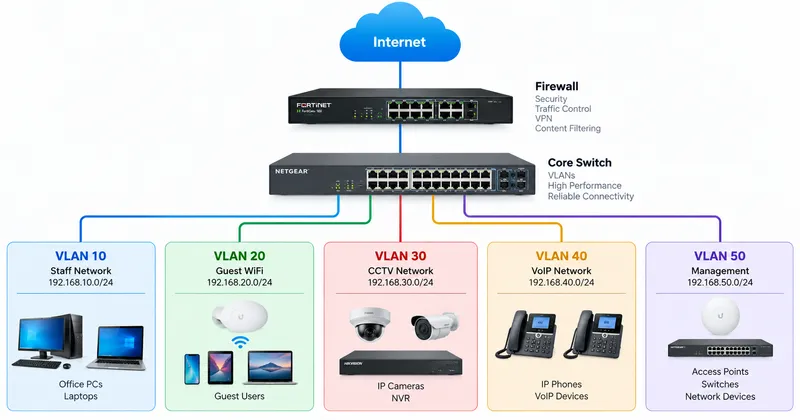
Subnetting breaks a large IP range into smaller, manageable blocks using a subnet mask or CIDR notation (such as /24, /26, or /28). For example, a 192.168.10.0/24 subnet allocates addresses from 192.168.10.1 to 192.168.10.254.
Standard Enterprise Subnetting Example:
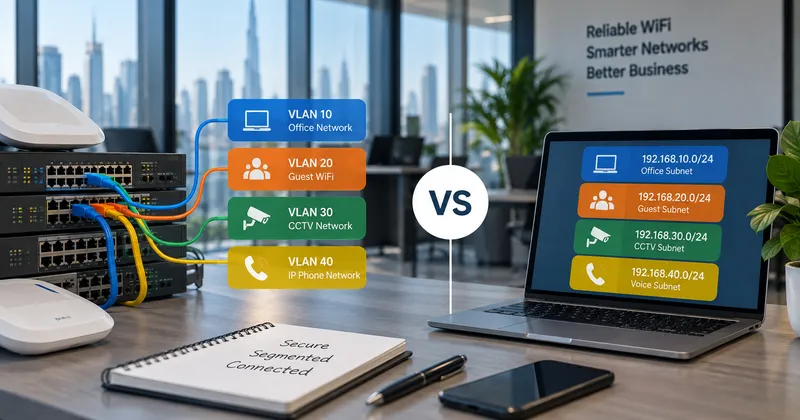
192.168.10.0/24→ Corporate Office Network192.168.20.0/24→ Guest Wireless Network192.168.30.0/24→ NVR & Security Cameras192.168.40.0/24→ IP PBX & Desk Phones
Subnets give network engineers control over routing tables, DHCP assignments, access control lists (ACLs), and inter-network communication via Layer 3 firewalls.
Upgrading Your Office or Villa Network Infrastructure?
Get an expert assessment from our trusted engineers. We design robust VLAN architectures where service quality is high and our cost also affordable.
💬 Speak to an Engineer on WhatsAppVLAN vs Subnet: Side-by-Side Comparison
Although VLANs and subnets are commonly deployed in a 1:1 mapping (such as VLAN 10 mapped to Subnet 192.168.10.0/24), they serve entirely different technical roles.
| Feature | VLAN (Virtual LAN) | Subnet (Subnetwork) |
|---|---|---|
| Main Purpose | Separates network traffic logically on physical switches | Divides IP address blocks for logical routing |
| OSI Layer | Layer 2 (Data Link Layer) | Layer 3 (Network Layer) |
| Based On | VLAN ID (802.1Q Ethernet frames) | IP addresses and Subnet Masks (IPv4 / IPv6) |
| Common Equipment | Managed Switches, Wireless Access Points, Firewalls | Routers, Layer 3 Switches, Firewalls |
| Core Benefit | Isolates broadcasts, restricts lateral movement | Structured IP addressing and granular routing control |
| Reduces Broadcasts? | Yes (confines Layer 2 broadcast domains) | Yes (Layer 3 broadcasts are contained within the subnet) |
| Used with WiFi? | Essential for multi-SSID mapping | Required for assigning DHCP pools per SSID |
How VLANs and Subnets Work Together in Enterprise WiFi
In modern corporate and residential wireless environments, VLANs and subnets operate in harmony. Enterprise-grade access points (such as Ubiquiti UniFi, Cisco, Ruckus, or Aruba) broadcast multiple SSIDs from the same physical radio:
Office Staff SSID → Tagged to VLAN 10 → Subnet: 192.168.10.0/24 (Direct LAN & Server Access)
Guest WiFi SSID → Tagged to VLAN 20 → Subnet: 192.168.20.0/24 (Internet-Only, Client Isolation)
Management SSID → Tagged to VLAN 30 → Subnet: 192.168.30.0/24 (Restricted to IT Administrators)
When an employee connects to the Office SSID, the wireless access point tags packets with VLAN 10. The core switch carries these tagged frames directly to your firewall, which hands out an IP from the 192.168.10.X pool and applies corporate security rules. Meanwhile, visitors on the Guest SSID receive IP addresses from 192.168.20.X, completely isolated from company servers and printers.
Do VLANs Replace Subnets?
No, VLANs do not replace subnets. They complement each other. While a VLAN prevents Layer 2 packet leakage across switch ports, a subnet governs Layer 3 routing. Whenever devices on different VLANs need to communicate (e.g., staff laptops sending print jobs to a shared printer on VLAN 50), Inter-VLAN Routing is performed by a Layer 3 switch or firewall using clearly defined access rules.
Experiencing Sluggish WiFi, Network Drops, or IP Conflicts?
Our honest, certified engineers diagnose switch tagging errors, trunk misconfigurations, and subnet exhaustion rapidly.
💬 WhatsApp for Rapid SupportServing Customers Across the UAE
Are you searching for dependable, certified network engineering and business WiFi support .near Me? WiFi Expert Team deploys on-site network specialists across every emirate in the UAE, delivering swift troubleshooting, switch configuration, and full network overhauls.
Dubai Residential & Commercial Areas
Downtown Dubai, Business Bay, Dubai Marina, Jumeirah, Palm Jumeirah, Arabian Ranches, Emirates Hills, Mirdif, Al Khawaneej, Jumeirah Lake Towers (JLT), Al Barsha, Deira, Bur Dubai, Dubai Hills Estate, DAMAC Hills, JVC, DIFC, and Dubai Silicon Oasis.
Sharjah Local Areas
Al Majaz, Al Nahda Sharjah, Al Taawun, Al Qasimia, Muwaileh, Al Khan, Al Suyoh, Al Rahmaniya, Industrial Areas, and University City.
Abu Dhabi
Al Reem Island, Yas Island, Saadiyat Island, Khalifa City, Al Khalidiyah, Al Bateen, Mohammed Bin Zayed City (MBZ), Al Raha Beach, and Mussafah.
Ajman & Northern Emirates
Ajman Local Areas: Al Nuaimiya, Al Rashidiya, Al Jurf, Al Rawda, Emirates City.
Northern Emirates: Ras Al Khaimah, Fujairah, and Umm Al Quwain.
Industries We Serve
Every commercial and residential environment poses unique traffic requirements. Our trusted engineers configure customized VLAN and subnet segmentations tailored precisely to your operational workflow:
Brands We Support
We work with almost all popular router, access point, and Wi-Fi system brands available in the UAE market.
Book a Free On-Site Consultation Today
Let our trusted IT specialists configure your VLANs, subnets, and mesh WiFi properly. Our solutions are reliable and our cost also affordable.
💬 WhatsApp: +971 54 343 9767Verified Customer Reviews
See why residential and business clients trust our certified network specialists across the UAE.
"I had a great experience with WiFi Expert Teams! My router stopped working after a reset, and I was struggling to get it back online. The team was quick to respond, and their technicians were knowledgeable and efficient in diagnosing and fixing the issue. They not only got my router working again but also optimized my WiFi network for better performance. The service was professional, and the turnaround time was impressive. I highly recommend WiFi Expert Teams for anyone facing WiFi or router issues!"
"its very heplful they fix our wifi immediately, good service thanks very much to them."
"Best service ever and so fast really appreciate"
"Excellent service and very professional"
Frequently Asked Questions (FAQs)
1. Does my small business really need both VLANs and Subnets?
Yes. In nearly all professional networks, VLANs and subnets are implemented together. A VLAN isolates the traffic at Layer 2 so that guests cannot access your internal systems, while the subnet enables your router or firewall to control communication and routing at Layer 3. Our trusted specialists can design this seamlessly.
2. How does network segmentation improve WiFi speed and coverage?
Without VLANs, broadcast traffic from printers, smart TVs, and staff laptops is sent to every wireless client, causing airtime congestion and battery drain. Segmenting traffic cuts unnecessary broadcasts, freeing up WiFi bandwidth for critical applications.
3. Will configuring VLANs and subnets be expensive for my office or villa?
Not at all. We provide an honest assessment of your existing network hardware. If your current switches and access points support 802.1Q tagging, no new equipment is required, making our professional configuration cost also affordable.
4. Can I separate my IP CCTV cameras and smart home gadgets from my main WiFi?
Yes. Creating dedicated CCTV and IoT VLANs is one of our most requested setups. It ensures smart doorbells and surveillance systems cannot compromise your private personal computers or business databases.
5. How quickly can your technicians assist with network segmentation in Dubai?
We offer same-day and scheduled on-site emergency visits throughout Dubai, Sharjah, Abu Dhabi, and other emirates. Reach out to our team on WhatsApp or phone for immediate support.
Ongoing Support for Every Product We Deliver
Our commitment doesn’t end with installation. We provide reliable ongoing support and maintenance to help keep your network fast, secure, stable, and performing smoothly throughout the year.
Get Your Free Network Assessment & Consultation
Speak with an honest, certified engineer to optimize your switches, VLAN configurations, and business WiFi with confidence.
Helpful Resources & Guides
Related Topics More Words: Related Network Services
VLAN configuration services Dubai, Layer 2 vs Layer 3 network design, business IP subnetting UAE, guest WiFi network segmentation, structured Cat6 network cabling, access point setup near me, managed IT networking Dubai, inter-VLAN routing firewall configuration, UniFi switch VLAN setup, enterprise VoIP voice VLAN priority, CCTV isolation subnet setup, office wireless network speed booster, emergency WiFi repair Dubai, affordable network engineer UAE.