Understanding MAC Address Filtering in Modern Wireless Networks
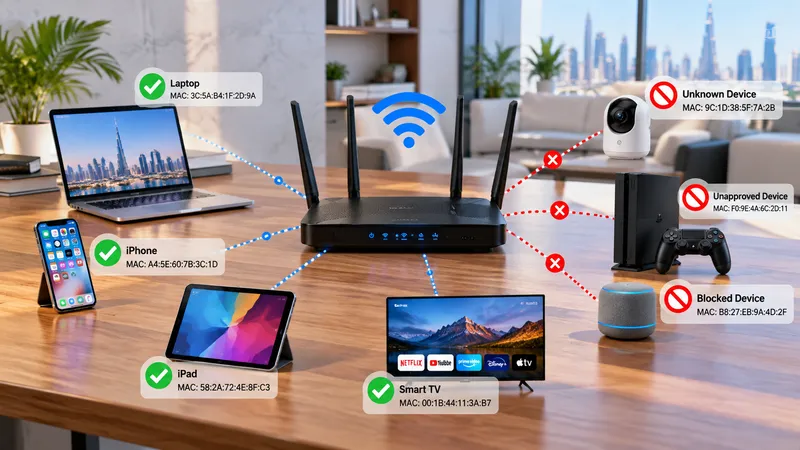
MAC address filtering is a Layer 2 network security feature that allows or blocks devices from connecting to a WiFi network based on their unique physical hardware addresses. Available on wireless routers, access points, and business WiFi controllers, it acts as an access gatekeeper for connecting devices.
For homes and corporate offices across Dubai and the UAE, MAC address filtering can provide an additional baseline layer of device access control. However, it should never be treated as your sole security barrier because hardware MAC addresses can be spoofed, and modern mobile operating systems utilize randomized private MAC addresses that can disrupt legitimate connectivity.
At WiFi Expert Team, we are a trusted network engineering partner helping clients configure multi-layered cybersecurity, isolated VLANs, and robust enterprise authentication. We provide an honest assessment of your network vulnerabilities, ensuring your wireless infrastructure is secure while keeping deployment and ongoing maintenance cost also affordable.
Need an Honest Assessment of Your Office or Villa WiFi Security?
Connect with our senior network engineer on WhatsApp for professional advice on access control and encryption.
WhatsApp Us NowWhat Is a MAC Address and How Does Filtering Work?
A MAC (Media Access Control) address is a unique 48-bit identifier permanently embedded into a device's network interface card (NIC), such as a WiFi chip or Ethernet port. It is typically represented as six pairs of hexadecimal characters separated by colons, for example: A4:5E:60:12:34:56.
When a laptop, smartphone, or printer attempts to associate with a wireless access point, it transmits its MAC address in unencrypted Layer 2 frames. The router cross-references this address against an internal access control list (ACL):
1. Allowlist (Whitelist) Filtering
Only devices whose MAC addresses are explicitly registered in the approved table are permitted to join. All other devices are rejected automatically, even if they possess the correct WiFi password.
2. Blocklist (Blacklist) Filtering
Specific unwanted or compromised MAC addresses are barred from connecting, while any other device entering the correct password is authorized to access the network.
Benefits vs. Critical Limitations of MAC Filtering
Core Benefits
- Device Access Control: Prevents unauthorized devices or neighbors from casually associating with private WiFi networks.
- Policy Enforcement: Restricts specific networks to dedicated hardware like office printers, NVRs, and VoIP phones.
- Supplementary Checkpoint: Works alongside WPA2/WPA3 password protection as an extra checkpoint on small setups.
- Simple Home Management: Enables homeowners to set basic scheduling or access limits on specific smart TVs or tablets.
Critical Limitations
- Easily Spoofed: MAC addresses are transmitted unencrypted over the air. An attacker can inspect an allowed address and clone it in seconds.
- Zero Traffic Encryption: Filtering only inspects identifiers; it does not protect passwords, emails, or data transfers from interception.
- Randomized MAC Addresses: iOS, Android, and Windows randomly rotate MAC addresses by default for privacy, triggering false connection drops.
- Heavy Maintenance: Manually registering 12-character hex codes for every new employee phone or laptop does not scale for growing companies.
MAC Address Filtering vs WPA2 and WPA3 Security
| Feature | MAC Address Filtering | WPA2 / WPA3 Enterprise Security |
|---|---|---|
| Main Purpose | Controls network association based on hardware identifiers | Cryptographically authenticates users and encrypts over-the-air data |
| Encrypts WiFi Traffic | No (Data packets remain vulnerable without WPA) | Yes (Employs strong 128-bit or 192-bit AES encryption) |
| Spoofing Resistance | Very Low (Easily cloned using free network tools) | Very High (Protected by dynamic handshakes & certificates) |
| Enterprise Scalability | Poor (Requires tedious manual device registration) | Seamless (Integrates with 802.1X, RADIUS, Azure AD & MDM) |
| Recommended Role | Secondary policy layer for static IoT or printers | Mandatory primary security foundation for all networks |
Upgrading Your Office or Commercial Network Security?
Deploy scalable 802.1X authentication, isolated guest portals, and VLANs with our trusted engineers while keeping your cost also affordable.
Speak to an Engineer on WhatsAppHow to Properly Secure Business WiFi in Dubai
Rather than relying solely on manual MAC address lists, enterprise environments across Dubai require structured access control combined with automated network segmentation:
WPA3-Enterprise & 802.1X
Authenticate employees via individual corporate credentials against a central RADIUS or cloud directory rather than sharing one common password.
VLAN Network Segmentation
Isolate staff computers, guest visitors, IP surveillance cameras, and VoIP telephone traffic into distinct broadcast domains to stop lateral intrusion.
Client Isolation Guest Portals
Ensure visitor mobile devices have internet access only, completely barred from communicating with other client devices or internal servers.
Centralized Controller Management
Monitor active client health, detect rogue access points, apply automated firmware patches, and revoke access instantly from a cloud dashboard.
Protect Your Corporate Data and Customer Traffic
Book an honest on-site security inspection from certified network engineers today.
WhatsApp: +971 54 343 9767Serving Customers Across the UAE
Looking for certified network security specialists and wireless infrastructure engineers .near Me? WiFi Expert Team delivers prompt on-site support across all Emirates:
Dubai Residential & Commercial Areas
Downtown Dubai, Dubai Marina, Business Bay, JLT (Jumeirah Lake Towers), DIFC, Palm Jumeirah, Arabian Ranches, Emirates Hills, Mirdif, Al Khawaneej, Al Barsha, Deira, Bur Dubai, Dubai Hills Estate, DAMAC Hills, JVC, and Dubai Silicon Oasis.
Sharjah Local Areas
Al Majaz, Al Nahda Sharjah, Al Taawun, Al Qasimia, Muwaileh, Al Khan, Al Suyoh, Al Rahmaniya, Industrial Areas, and University City.
Abu Dhabi Local Areas
Al Reem Island, Yas Island, Saadiyat Island, Khalifa City, Al Khalidiyah, Al Bateen, Mohammed Bin Zayed City (MBZ), Al Raha Beach, and Mussafah.
Ajman & Northern Emirates
Ajman Local Areas: Al Nuaimiya, Al Rashidiya, Al Jurf, Al Rawda, Emirates City.
Northern Emirates: Ras Al Khaimah, Fujairah, and Umm Al Quwain.
Industries We Serve
Our network security configurations, access control policies, and firewall implementations protect organizations across diverse sectors:
Brands We Support
We work with almost all popular router, access point, and Wi-Fi system brands available in the UAE market.
Ready to Fortify Your Wireless Network Security?
Book a certified network engineer today. Professional assessment, reliable deployment, and cost also affordable.
WhatsApp: +971 54 343 9767Verified Customer Reviews
Real experiences from residential and business clients who trust our network optimization services.
"I had a great experience with WiFi Expert Teams! My router stopped working after a reset, and I was struggling to get it back online. The team was quick to respond, and their technicians were knowledgeable and efficient in diagnosing and fixing the issue. They not only got my router working again but also optimized my WiFi network for better performance. The service was professional, and the turnaround time was impressive. I highly recommend WiFi Expert Teams for anyone facing WiFi or router issues!"
"its very heplful they fix our wifi immediately, good service thanks very much to them."
"Best service ever and so fast really appreciate"
"Excellent service and very professional"
Frequently Asked Questions (FAQs)
1. Does MAC address filtering make our WiFi network completely secure?
No. It provides a helpful Layer 2 checkpoint against casual associations, but MAC addresses are easily sniffed and spoofed by attackers using free network software. True wireless cybersecurity requires robust WPA3/WPA2-AES encryption and proper network segmentation.
2. Why do new iPhones and Android devices get blocked when MAC filtering is enabled?
Modern mobile operating systems activate "Private WiFi Addressing" by default, generating a randomized virtual MAC address for each SSID. Because this randomized address changes, it will not match the registered hardware address in your router allowlist unless manually coordinated.
3. Is MAC address filtering practical for offices in Dubai?
In larger corporate offices, manually registering every employee's phone, laptop, and tablet creates enormous administrative overhead. Enterprise 802.1X authentication, corporate directory logins, and isolated guest portals provide far superior security that scales effortlessly.
4. What is the difference between MAC filtering and a firewall?
MAC filtering only permits or denies initial Layer 2 wireless association based on device hardware ID. A firewall operates at Layers 3 through 7, actively inspecting packet states, source/destination IPs, ports, and protocols to block malicious traffic and intrusions.
5. How can WiFi Expert Team secure our business network properly?
Our trusted engineers conduct on-site security audits, implement isolated guest VLANs, configure RADIUS server authentication, and secure access points with enterprise encryption while keeping our implementation cost also affordable.
Ongoing Support for Every Product We Deliver
Our commitment doesn’t end with installation. We provide reliable ongoing support and maintenance to help keep your network fast, secure, stable, and performing smoothly throughout the year.
Get Your Free WiFi Security Assessment & Audit
Need an honest technical review of your wireless access controls and firewall policies? Speak with our certified security engineers today.
Helpful Resources & Guides
Related Topics : Related Network Services
MAC address filtering Dubai, wireless network security setup UAE, WPA3 enterprise encryption, router access control list configuration, business WiFi security audit near me, guest WiFi network isolation, office VLAN segmentation Dubai, RADIUS server 802.1X setup, commercial firewall installation, affordable network engineer UAE.