Network Panel Setup Services in Dubai & UAE
Organized Structured Cabling & Professional Rack Management for Offices & Businesses
The Foundation of a Reliable Business Network
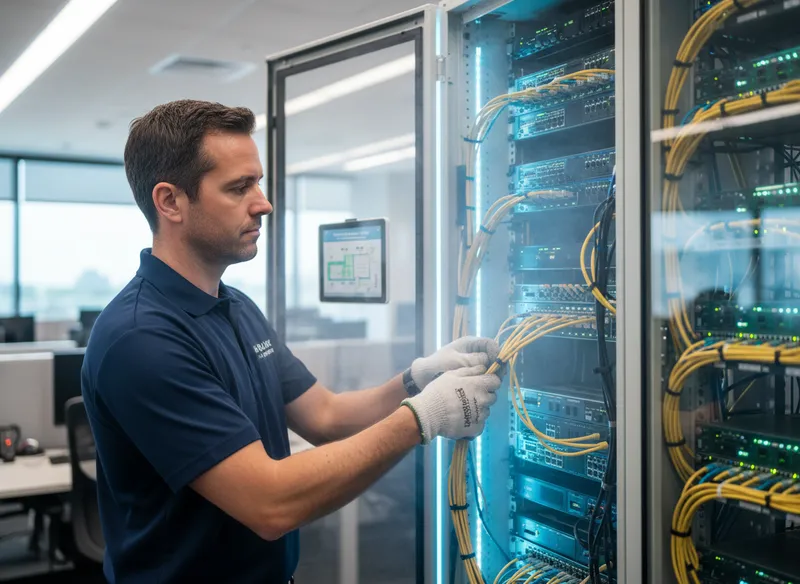
A well-organized network panel is truly the heart of any scalable and easy-to-maintain IT infrastructure. WiFi Expert Team offers an Honest and Trusted approach to building clean, professional network cabinets across the UAE. We believe that professional WiFi Cabling Services are essential for preventing the messy "spaghetti" of wires that often leads to excessive downtime. Our engineers focus on precision termination and logical labeling to ensure your business remains online without interruption. You can rely on us to transform a cluttered server room into a high-performance control center. Establishing this foundation is critical for supporting advanced cloud applications and secure financial transactions.
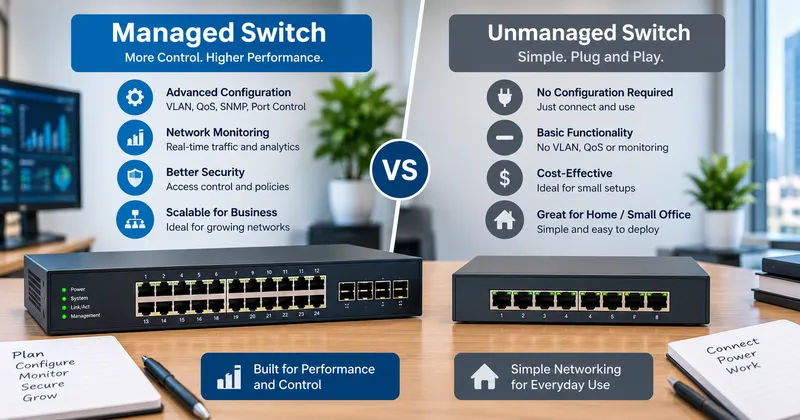
Every workspace has unique requirements that demand a customized New WiFi Installation strategy. Your central network rack connects everything from high-speed computers to smart IP cameras and VoIP phones. Our mission is to provide a Trusted environment where troubleshooting becomes instantaneous rather than a day-long struggle. We utilize premium patch panels and managed switches to maximize the efficiency of your data flow. Choosing an Honest partner ensures you get the right hardware without unnecessary overhead costs. Reliability begins the moment we terminate your first Cat6 cable.
Core Panel Features
Professional Access Point Installation starts with a correctly wired patch panel. Our technicians use high-quality Cat6A and fiber optics to create a future-proof backbone for your office. We provide rigorous cable testing and certification to ensure every port delivers its maximum rated speed. Clear port identification and color-coded patch cords make your infrastructure easy to navigate for any IT manager. You will enjoy a network that is both aesthetically pleasing and technically superior.
Strategic Benefits
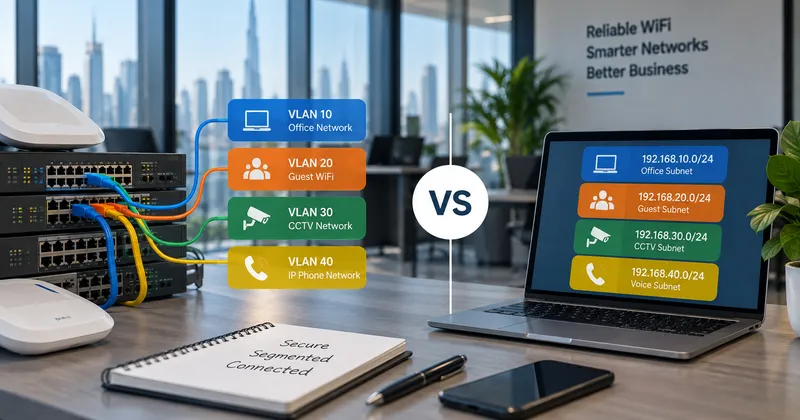
Maintaining business continuity is easy when your WiFi Troubleshooting is backed by a structured panel setup. We help minimize operational risks by isolating guest traffic and securing your primary servers through VLAN configuration. Proper rack management improves airflow, which prevents your expensive routers from overheating during the UAE summer. Our Honest onsite support teams are ready to reorganize messy cabinets to restore order to your digital life. Fast response times ensure that any physical connection issue is resolved before it affects your revenue.
Engineered for Seamless Communication
A Trusted network panel setup handles the complex integration of various communication technologies flawlessly. We ensure that your WiFi Relocation Services include a full audit of your current patch cords and switch ports. Our engineers implement specialized WiFi Optimization Service settings to prioritize video calls and financial data. Whether you are moving to a new corporate floor or upgrading an old warehouse, the physical wiring remains the most critical factor. We bridge the gap between your ISP modem and your user devices with military-grade precision. High-stakes meetings require a connection that never wavers, and we build the panels that make that possible.
Professional WiFi Repair Services often involve re-terminating poorly punched-down cables that cause intermittent signal loss. Our team of Honest engineers uses Fluke testers to verify the integrity of every link in your building. We believe in doing the job right the first time to avoid costly rework in the future. Total signal saturation across your property is only achievable when your backbone is strong and organized. Experience the difference of having a Trusted technical partner managing your rack infrastructure. Your success is powered by the stability we provide at the source.
Our Specialized WiFi & Networking Services
Understanding Wireless Internet Extenders
What are wireless internet extenders, and how do they function?
Wireless range extender, Wireless internet extenders, also known as Wi-Fi extenders or boosters, extend the range of your Wi-Fi signal. They function by receiving the existing Wi-Fi signal from your router, amplifying it, and retransmitting it to areas with poor connectivity. This helps eliminate dead zones and improve Wi-Fi coverage throughout your home or office.
When should you use a wireless internet extender?
A wireless internet extender is beneficial in situations where certain areas of your home or office suffer from weak Wi-Fi signals or complete dead zones. They are ideal for larger spaces or buildings with multiple floors, thick walls, or other obstructions that interfere with the Wi-Fi signal. Extenders help provide a stable and strong connection in these areas.
What’s the difference between a wireless range extender and a mesh network?
A wireless range extender simply rebroadcasts the signal from your router, extending its coverage in certain areas. A mesh network, on the other hand, uses multiple nodes placed around the building to create a seamless network with consistent coverage everywhere. Mesh systems are typically more powerful for large homes or offices, while extenders are a more budget-friendly solution for smaller areas.
How do dual-band Wi-Fi extenders improve your network?
Dual-band Wi-Fi extenders work on both the 2.4 GHz and 5 GHz bands, offering better flexibility and performance. The 2.4 GHz band provides wider coverage but slower speeds, while the 5 GHz band offers faster speeds for devices closer to the router. Dual-band extenders allow devices to switch between bands based on their needs, reducing network congestion and ensuring smoother internet access.
Brands We Support
We work with almost all popular router, access point, and Wi-Fi system brands available in the UAE market. Our Honest technical advice helps you pick the right hardware for your building.
What Our Clients Say
Frequently Asked Questions
Can a Wi-Fi extender replace my router?
No, a Wi-Fi extender cannot replace your router. Extenders are designed to boost and extend the signal from your existing router, not to act as a primary internet source. Some extenders with an Ethernet port can act as access points when connected directly to a modem, but this setup does not offer the full functionality of a router.
Does setting up a Wi-Fi extender reduce my overall internet speed?
Wi-Fi extenders may slightly reduce the speed of your internet in extended areas because they split the bandwidth between transmitting and receiving the signal. Dual-band extenders help mitigate this issue by dedicating one band for communication with the router and another for connecting devices. However, for optimal speed, try to place the extender in an area with a strong signal from the router.
How do I use multiple Wi-Fi extenders with a single router?
You can use multiple Wi-Fi extenders with a single router, but it’s essential to position them correctly to avoid signal interference. Each extender should be within a good range of the router or another extender, and they should not overlap too much. Set up each extender individually, following the same setup process. This approach allows you to extend Wi-Fi coverage across larger areas effectively.
What is a wireless range extender, and how does it work?
A wireless range extender, also known as a Wi-Fi extender or repeater, is a device designed to improve the coverage of your Wi-Fi network. It works by receiving the Wi-Fi signal from your router and retransmitting it to areas of your home or office that have weak or no signal. This helps extend the range of your network, ensuring you have a stable connection in places far from the router.
How do I set up a Wi-Fi extender with my existing router?
To set up a Wi-Fi extender with your router, place the extender within range of your router’s Wi-Fi signal. Plug it in and connect to the extender’s setup network through a smartphone or computer. Access the configuration interface through a web browser, select your home Wi-Fi network, and enter your password to pair the extender with your router. Once configured, the extender will broadcast the boosted signal.
Can you organize a messy server room in Dubai?
Yes, our Honest technicians specialize in cable management and rack cleanup to make your IT environment Trusted and professional. We label all lines to simplify future maintenance.
Serving All Over the UAE
Marina, Downtown, Business Bay, Palm Jumeirah, JVC, JLT, Al Barsha, Silicon Oasis, Arabian Ranches, Emirates Hills.
Al Majaz, Al Nahda, Muwaileh, Al Khan, Sharjah Waterfront, Rolla, Al Qasimia, Industrial Areas.
Khalifa City, Reem Island, Saadiyat, MBZ City, Mussafah, Al Raha, Airport Road.
Ajman Downtown, Al Jurf, Ras Al Khaimah, Fujairah, Umm Al Quwain.
Get Your Free Network Consultation
Don't let a messy network slow your business down. Contact our Honest experts today.
Top Searches
Network Panel Setup Dubai • Patch Panel Installation UAE • Network Rack Setup • Network Cabinet Configuration • Network Cable Management Dubai • Cat6 Cabling Sharjah • Office Network Setup Abu Dhabi • Structured Cabling UAE • Ethernet Termination Dubai • PoE Switch Installation • WiFi Access Point Cabling • Business IT Infrastructure UAE • Server Room Organization • Network Troubleshooting Dubai • Data Cabling Sharjah • Professional Network Technicians UAE.